Invoice Collections Automation for Home Service Businesses
Invoice collections automation helps home service shops recover aging receivables without adding staff, but most owners don't have a system for it.
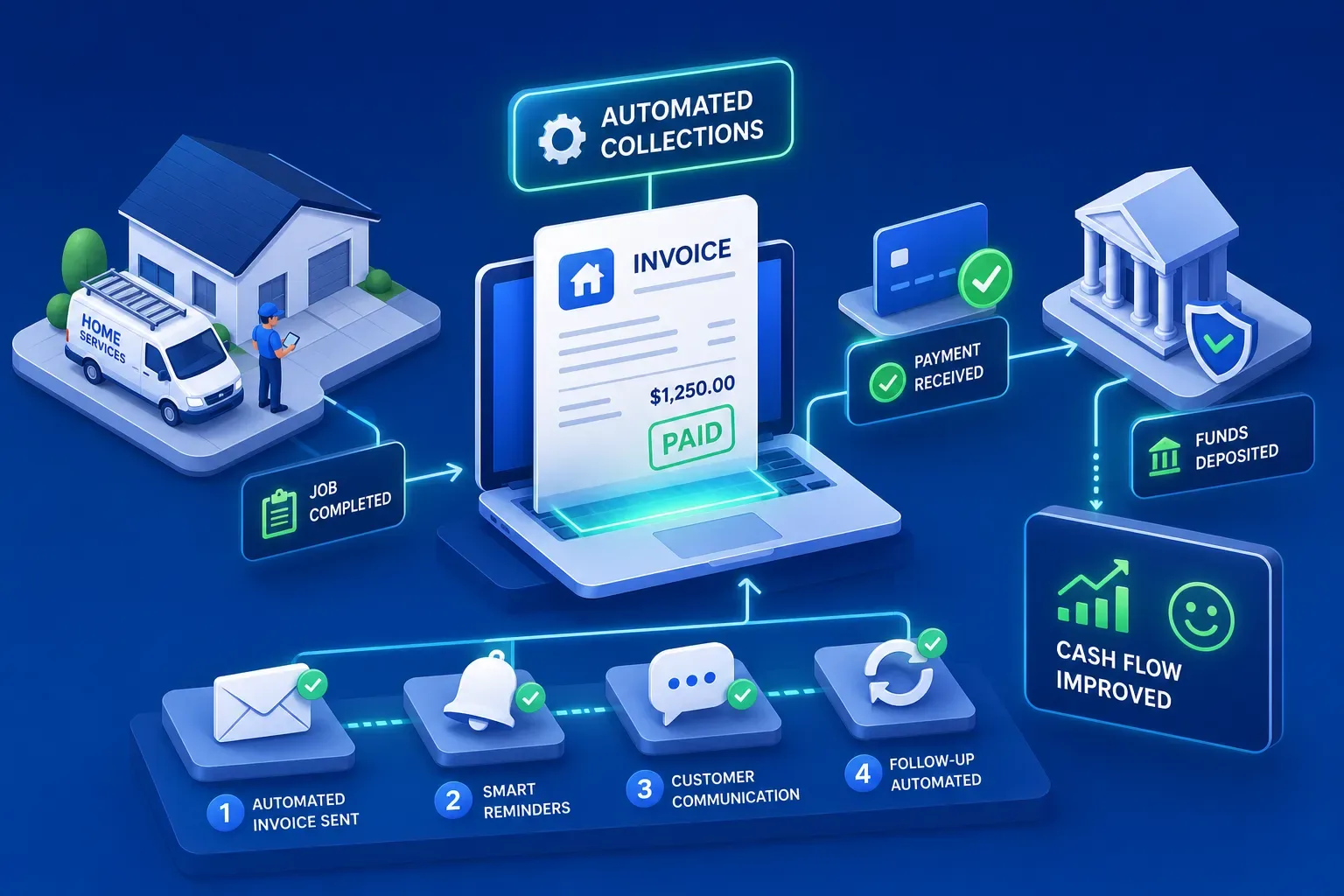
Invoice collections automation helps home service shops recover aging receivables without adding staff, but most owners don't have a system for it. They run jobs during the day and chase unpaid invoices at night. It's not a discipline problem. It's a structural one: nobody in a small HVAC or plumbing shop owns accounts receivable follow-up as a defined role, so it falls to whoever has five minutes, which is usually nobody. The result is an aging report full of money that's already been earned but hasn't been collected. Shops that solve this with automated AR follow-up are recovering real dollars fast. In one documented case, a home services business recovered $12,400 in aging receivables within 90 days of deploying an automated collections workflow, without adding a single staff member.
This guide covers how the automation actually works, what a real follow-up sequence looks like, which features matter for a field service shop, and what kind of cash-flow recovery you can realistically expect. If your invoices are aging past 30 days without consistent follow-up, this is where you start.
Why unpaid invoices keep stacking up in field service shops
The owner ends up being the collections department
In a small HVAC or plumbing shop, nobody officially owns AR follow-up. The owner is on job sites or doing ride-alongs. The office manager is booking the next call and scheduling techs. Invoices age quietly in the background until someone notices the bank account looks thin and starts pulling reports at 9pm. This isn't a motivation problem. It's a process gap: follow-up falls between roles and never gets done consistently. Small trades businesses rarely have a dedicated AR position, which means collections work competes directly with revenue-generating tasks for the same limited hours.
Manual chasing doesn't scale
Manual AR follow-up has a real cost in time. It means pulling an aging report from QuickBooks, calling or emailing each overdue customer individually, logging notes, and following up again in a week. According to SCORE, small business owners spend an average of roughly 86 hours per year chasing late invoices, about 1.7 hours a week. At higher invoice volumes, that number climbs fast. For a working owner-operator already putting in 60-hour weeks, that time simply doesn't exist.
The 60-day threshold where invoices get dangerous
Recovery rates drop sharply as invoices age. At 60 days overdue, structured automated follow-up sequences recover roughly 60 to 80 percent of balances. By 90 days, recovery probability falls to around 28 percent. That window closes faster than most owners realize. A system that catches overdue invoices at 30 and 60 days is the difference between collecting that money and writing it off. Data from the Small Business Administration indicates that 64 percent of small businesses carry invoices outstanding more than 60 days at any given time, meaning this isn't an edge case. It's the norm.
How invoice collections automation actually works
It starts with your existing data
Invoice collections automation doesn't require building a new workflow from scratch. The system connects to where your invoice data already lives: QuickBooks, Jobber, ServiceTitan, HCP. It monitors invoice aging in real time, without manual report-pulling. The platform watches invoice status continuously and triggers actions when defined thresholds are crossed. The data you're already generating starts doing work for you.
Trigger-based logic: what fires a follow-up
The mechanics are straightforward. An invoice hits 7 days past due and a friendly payment reminder goes out automatically. At 30 days, a firmer follow-up fires with a different tone. At 60 days, the invoice escalates, either to a different message or directly to the owner's attention. Each step is defined once. The system runs it consistently, on every invoice, every time, without someone having to remember to check the aging report.
Multi-channel outreach without extra effort
Good AR automation doesn't send one email and hope for the best. It uses email, SMS, or both depending on which channel that customer actually responds to. It's a sequenced, multi-touch approach that mirrors what a dedicated AR person would do, without requiring one. The sequence runs in the background while you're running jobs.
Key features of invoice collections automation for home service shops
QuickBooks and FSM integration are non-negotiable
Integration depth is the first filter when evaluating any collections management platform. If the tool doesn't pull live invoice and payment data from QuickBooks and your field service management software, you'll spend time manually syncing data, which defeats the purpose entirely. The automation is only as current as the data feeding it. Look for native, configured integrations with the tools you already use, not custom development projects that take months to build.
Aging-bucket visibility and escalation rules
The dashboard should give you clear 30, 60, and 90-day aging buckets with the ability to set custom escalation thresholds. The highest-dollar or most-at-risk invoices should surface first. A good collections platform doesn't just send reminders, it helps you prioritize where to put your attention when a situation actually requires manual follow-up. If you have to dig to find out which invoices need your attention today, the tool isn't doing its job.
Reporting that shows cash recovered, not just emails sent
Some platforms show "reminders sent" as the headline metric. That's a vanity number. What matters is cash collected, DSO trend, and which invoices moved from overdue to paid after automation touched them. If the platform can't show you that clearly, it's an email scheduler with a collections label, not a genuine receivables automation tool. Measure outcomes, not activity.
What a real follow-up sequence looks like in practice
The 30/60-day flag in action
Maximus is built specifically for home services operators running $1M to $5M shops and deploys AI-powered collections workflows directly inside a client's existing workflow. When an invoice crosses 30 days overdue, the platform flags it and initiates outreach on the owner's behalf. At 60 days, it escalates with a different message and higher urgency. The owner doesn't have to touch it unless the customer responds or the invoice requires a judgment call. The follow-up happens on schedule, automatically, whether or not the owner remembered to check.
What the messages actually sound like
The tone progression matters. The first reminder is neutral and professional: just making sure this didn't slip through. The 30-day follow-up is direct: we'd like to resolve this before it requires escalation. The 60-day message is firm but not aggressive. The key is that it sounds human rather than like a mass blast, because it's written in the owner's voice and tied to a specific job and invoice number. Research on dunning effectiveness consistently shows that personalized, job-specific messages outperform generic payment requests, a generic email from an unfamiliar platform simply doesn't move the needle the same way.
When automation stops and a human steps in
Automated invoice collections aren't designed to handle every situation. When a customer disputes an invoice or a strategic relationship is at stake, the system flags it for the owner and stops automated outreach. That boundary matters. The goal is to automate the routine 80 percent of follow-ups, not every edge case. Judgment on a long-term commercial account stays with the owner. The system handles the rest.
What you can realistically recover and how fast
DSO benchmarks after automation
Home service businesses typically carry DSO in the 30 to 55-day range before any automation is in place. After implementing automated invoicing and follow-up workflows, DSO reduction tools and industry benchmarks suggest that range drops to 8 to 14 days for shops that deploy consistently. That's a 20 to 40-day improvement in how quickly receivables convert to cash. To put that in concrete terms: a shop carrying $100,000 in monthly AR that cuts DSO by 30 days frees roughly $100,000 in working capital that was previously tied up in aging invoices, a material improvement in cash position within a single quarter.
Real recovery numbers from an automated AR system
Maximus recovered $12,400 in aging accounts receivable for a home services shop within 90 days of deployment. That money was already owed, sitting in the aging report, never getting consistently followed up on. Automation made the follow-up happen on schedule, every time, without the owner spending a morning on it. That's the whole mechanism: money already earned, recovered through consistent execution rather than manual effort.
Where the returns compound over time
The recovery isn't a one-time event. Once the follow-up sequence is running, every new invoice automatically enters the workflow. Bad debt write-offs decrease. Cash application improves. The compounding effect shows up in cleaner books and a more predictable cash position month over month. The first 90 days recover the backlog. The following months prevent a new one from forming.
Rolling out invoice collections automation without a big project
Start with your accounting and FSM connection
The practical first step is connecting the automation platform to QuickBooks and your field service software. For most home service shops using Jobber, HCP, or ServiceTitan, vendors including Maximus offer pre-configured integrations, not custom development projects. The platform reads your invoice data from day one. Many SMB-focused vendors report most deployments are operational within 48 hours of setup.
Define your escalation rules before you turn anything on
The sequence design matters more than the tool. Before automating anything, decide: when does the first reminder go out? What changes in tone at 30 days? Who gets notified at 60 days? Having those rules clear upfront means the automation reflects deliberate policy, not default settings nobody reviewed. Spending 30 minutes on this upfront saves months of inconsistent follow-up down the road.
Run it for 30 days and look at what moved
After the first 30 days, pull the report. Look at which invoices went from overdue to paid after an automated reminder touched them. Identify which ones needed a different approach. Adjust thresholds and message tone based on what the data shows. The goal in the first 90 days is to recover the existing aging AR backlog and build the operational habit of letting the system run consistently without manual intervention.
The follow-up work you already know you should be doing
Invoice collections automation for home service businesses isn't complicated software. It's a system that does the follow-up work you already know you should be doing but don't have time to do consistently. The shops recovering thousands in aging receivables aren't chasing harder. They set up a sequence, connected it to their existing data, and let it run.
If your invoices are aging past 30 days without a follow-up, the first step isn't hiring someone. It's automating the process you already have. Maximus was built specifically for home services shops in the $1M to $5M range to handle exactly this, including 24/7 call answering, dormant customer reactivation, and daily owner briefings, all without adding office staff. The money is already in your aging report. Invoice collections automation is the system that goes and gets it.